Extract 7Z, ZIP and RAR in your browser Works · nothing to install
Drop an archive below and pull the files out of it. It reads .7z, .zip, .rar, .tar, .gz, .bz2, .xz and .iso, among others.
Nothing is uploaded. The archive is read on your own machine and unpacked in a Web Worker; there is no server side to this page for a file to go to. That is worth knowing if the thing you are opening is not yours to hand to a stranger's website.
What it does
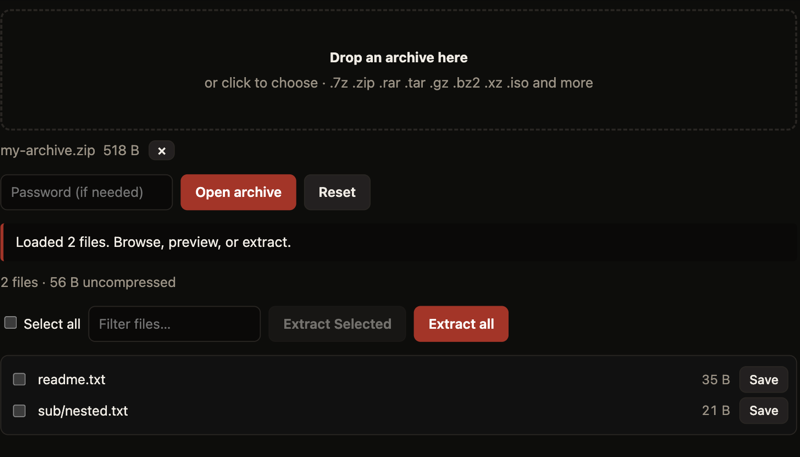
You can browse inside the archive before committing to anything: see the file tree, filter it, preview text and images, and save one file or the whole lot. Encrypted 7z and ZIP archives work too — put the password in the box before opening.
The engine is libarchive compiled to WebAssembly, which is the same library bsdtar uses, so the format support is the real thing rather than a ZIP-only reimplementation.
Why there are two archive pages here
We also run the actual 7-Zip program under Wine, and it genuinely works — but it has to download a 47.7 MB runtime and boot an x86 emulator first. That is the right tool if you specifically want 7-Zip's own interface or its exact behaviour.
For the ordinary case, this page does the same job with a 1.2 MB download and no emulation. Both pages link to each other and both say which is which.
Common questions
Does my file get uploaded anywhere?
No. The archive is read in your browser and unpacked in a Web Worker on your own machine. There is no server side to this tool, so there is nowhere for the file to go. You can watch the network tab and see for yourself.
Which formats does it open?
7z, ZIP, RAR, TAR, gzip, bzip2, xz and ISO, among others. It uses libarchive, the same library behind bsdtar, so the format support is the same as that.
Can it open password-protected archives?
Yes, for encrypted 7z and ZIP archives. Type the password into the box before opening the archive. The password stays in the page and is never transmitted.
How is this different from the 7-Zip page?
The 7-Zip page runs the genuine 7-Zip program under Wine, which means downloading a 47.7 MB runtime before it can start. This page does the ordinary job with a 1.2 MB download and no emulation.
Will it work on a school or work laptop?
It should, because there is nothing to install — it is an ordinary web page. See what else runs without installing anything. If the network filters this site by name, that still applies.
More you can run in your browser
Put Archive Extractor on your own site
This one is ours — written from scratch, not emulated — so you are welcome to embed it anywhere, free, with no permission needed. Paste this where you want it:
Keeping the credit line is the only thing we ask. Games we host but did not write are not offered for embedding, because those are not ours to hand on.